Open source
Read every line it runs.
Privacy claims are cheap; source code isn’t. Typurr is a single Rust binary you can build yourself — and the settings screen has nothing to hide because the config is a JSON file next to your models.
Windows · open source · 100% indoor
Typurr turns speech into clean, finished text at your cursor, in any Windows app — with speech and language models that live on your own hardware, like a well-fed house cat.
That correction wasn’t a typo fix. You said “thursday… actually friday” and it kept only what you meant.
Free and MIT licensed. Best on an NVIDIA GPU — real options for every other machine.
Windows · open source · runs on your GPU
Whiskurr is the local-first engine under Typurr, released for everything — chat, vision, and code on your own hardware, at ~1.8× the leading desktop LLM app's speed on identical weights.
First token in about half a second — and the conversation never reprocesses its own history.
Free and open source. New in 0.5: a coder that works like a workshop, an API that speaks tools, and a prompt cache with receipts.
Everything that ships from this project
Your machine serves one person, forever — and software designed for that beats software designed for datacenters. Everything below is free, open source, and local.
Dictation and voice control: speak, it types finished text into any app. Own trained models, self-auditing cleanup, and a memory of what you said.
The local-first inference layer under Typurr, released for everything: ~1.8× the leading desktop LLM app's decode on identical weights, conversations that never reprocess their history, every claim measured. New in 0.5: warm agent turns reuse 99.5–99.9% of the prompt — and a 284B model still holds the ceiling record on a 12 GB laptop.
The numbers · white paper · GitHub · why ↓
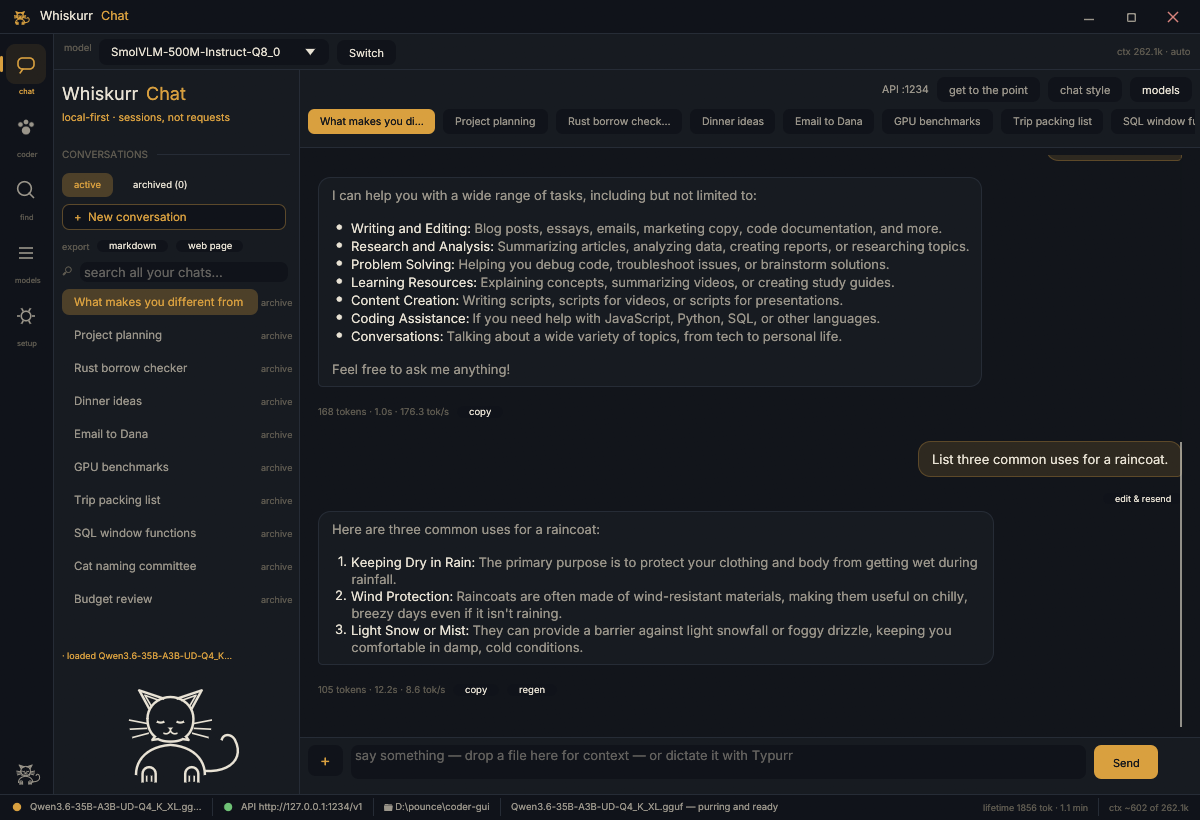
Load any GGUF from a dropdown, download models from Hugging Face, chat with streaming — or flip one switch and it's an OpenAI-compatible API every app on your machine can use. In 0.5 that API speaks tools, so any coding agent can point at it. 35B-class models on a 12 GB GPU.
Download (NVIDIA · AMD · Intel) · learn more
The Sketcher (0.8B, cleans speech while you talk) and the edit-tagger (cleanup with no text generation, ~150 ms on CPU) — self-trained, Apache-2.0, free for your own projects.
How it works
This is the whole pipeline. There is no fifth step where your voice visits a data center.
Push-to-talk, hands-free toggle, or just say “hey typurr” from across the room.
Whisper large-v3-turbo on your GPU, or Parakeet on CPU with a live transcript while you speak.
A 7B language model (llama.cpp, in-process) strips the “um”s, fixes punctuation, and resolves your self-corrections.
Injected into whatever has focus — editors, browsers, chat, even terminals, safely.
Warm end-to-end latency is ≈1 second on a consumer NVIDIA GPU. Models download once (a few GB) and live in a folder you can see.
The indoor-cat guarantee
bytes of your voice, text, or history. Ever.
There is no server: no account, no telemetry, no audio “retained to improve the service.” Your dictations, your corrections, and everything Typurr learns about how you speak live in plain files on your disk that you can open, read, and delete. Nothing to breach, nothing to subpoena, nothing phoning home in the night. (One honest asterisk: you can plug in your own AI provider key if your hardware needs it — that choice, and exactly what it changes, is spelled out below.)
The unfair advantage
Typurr's cleanup isn't a general-purpose AI with a clever prompt — it's two models we trained ourselves, for exactly one job: turning live speech into finished text. Both ship free (Apache-2.0), auto-downloaded.
Cleans your speech clause-by-clause while you're still talking — fillers gone, "dana, no wait, marcus" becomes "Marcus", "ten dollars" becomes "$10". On held-out dictation it scores 90.7% exact-match where its untuned base scores 0.0%.
For routine cleanup it doesn't generate text at all: one pass tags every word — keep, delete, punctuate, capitalize — in ~150 ms on CPU. Cleanup without the language-model tax. We believe no other dictation tool ships anything like it.
Every result is checked against what you actually said — an invented name or a number from nowhere is caught and redone by a bigger model. Fast paths when they're right, careful paths when they're not. You never see the difference; you just see correct.
Why can nobody copy this? Cloud tools can't clean text while you speak — a network round-trip per clause is too slow and too expensive. Other local tools rent generic models. Typurr owns its stack down to the weights: the text is ready the moment you release the key.
What it does to your day
Most people type around 40 words a minute and speak at 130–150. That jump normally dies in the cleanup: fixing punctuation, casing, the numbers, the names — until editing eats what dictation saved. Typurr's entire pipeline exists to delete that tax. You get finished text: your jargon spelled right, your self-corrections resolved, review-by-voice for the messages that matter, "send it" to ship without touching the keyboard. Reshape a rambling thought into a clean email, a structured spec, or an engineered AI prompt in one breath — and ask it what you told Dana last week when you've forgotten. The keyboard becomes the fallback, not the default.
Runs on your terms
Typurr is engine-swappable. Local is the default and the point — but not everyone has 8 GB of VRAM lying around, so here's the honest menu.
The full experience, fully local: Whisper large-v3-turbo for ears, a 7B model for the brain, ≈1s from voice to text. Nothing leaves. This is the build the accuracy bench guards.
Dictation stays fully local — Parakeet runs speech recognition fast on CPU, with the live transcript. Text cleanup runs on a small local model or through Ollama if you have it.
Point cleanup at any OpenAI-compatible provider — DeepSeek, Groq, OpenAI, OpenRouter… Your audio still never leaves: speech-to-text stays on your machine; only the transcript text goes to the provider you chose, under your own key.
The key never sits in plaintext: it's sealed with Windows DPAPI, bound to your user account on your machine — a copied config file leaks nothing. Every model the app downloads shows its license as it lands, and the Settings model picker lets you browse Hugging Face with license badges before choosing.
Features
Everything below is spoken, local, and optional — each one is a toggle in Settings.
Fillers dropped, punctuation added, and mid-sentence changes of mind resolved — say "…by thursday, actually friday" and only Friday survives. Four polish levels, from verbatim to full rewrite.
“…by thursday — actually friday”A streaming recognizer paints your words on the card as you say them — any engine, no length limit — and the cleaned text streams in as the model writes it. It even reads your pauses: "…at two… actually three" resolves the way you meant it, because the model hears how you spoke.
Read-backs and answers come from a neural voice running on your own CPU — not the robot from 1998. Start talking and it stops mid-sentence; you always have the floor.
“read it back” “stop talking”Every cleanup is checked against what you actually said — an invented name or a number from nowhere triggers an automatic correction pass. And it remembers where you undo or fix things, spending extra care exactly there.
Modes turn dictation into what you need: professional, casual, bullets, a spec builder that turns a brain-dump into requirements and acceptance criteria, a prompt-optimizer for AI tools, or your own. Select any text anywhere and one hotkey rewrites it in the current mode.
“using professional, …” “using spec, …”High-stakes modes hold their output on the card instead of typing it blind. Say “send it” and it lands where you were working; “scrap that” and it's gone — or just say what to change and the draft revises in place.
“make it tighter” “send it”The prompt-optimizer reads the window you're targeting, your clipboard, and the text already in the field — so “fix that error I copied” becomes a fully-specified instruction, not a vague wish.
“fix that error I copied”Switch windows, scroll, click buttons by their name, press key chords, type text verbatim, launch apps. New in 0.5, the words decide their own fate: sentence-shaped prose goes straight to your cursor with zero added latency; only short imperative leftovers get a second look from the local model, grammar-constrained so a malformed verdict can't execute. "Send the invoice to accounting before Friday" is typed, not executed — the bench holds it at 28/28 intents, 0 false actions on plain dictation.
“switch to chrome” “click send” “press control s”It remembers facts you tell it and searches your own dictation history. Answers land in a scratchpad and are read aloud with a local voice.
“ask typurr, what did I tell Dana?” “stop talking”Ask about whatever's on the monitor you're using — a local vision model answers. Catch up on a long AI reply without reading it. The screenshot never leaves RAM on its way to the model.
“what’s on my screen?” “what did Claude say?”An opt-in local MCP server (loopback only) lets agents like Claude Code speak to you, ask you a question by voice and get your cleaned-up spoken answer back, shape text through your modes, and search your dictation history.
the agent asks — you just answerSay "typurr do…" and it plans across its own tools — recall past dictations, reshape them, insert, track, summarize the screen — and runs the whole chain. Requests outside its tools get an honest "can't do that", never an improvisation.
“typurr do find what I said about pricing and read it to me”An optional little Tracker window lists the commitments it hears in your dictations — and crosses them off when your own words say they're done. Add, tick, or toss anything by hand.
“typurr tracker” “typurr todo ship the report”Your vocabulary biases speech recognition. Your corrections become rules. Your edits teach it style — and you can export your own speech-to-text pairs and train a personal model on how you talk. All stored in plain files you can read, edit, or wipe.
“correct that layla to Rayla”Every so often it studies your recent usage and authors snippets, custom modes, and per-app rules for you. Everything it does is journaled and one click to revert — and it never re-learns what you've rejected.
Opt-in idle listening that starts hands-free dictation when you call it. It answers to “typer” too — it's a cat, not a speller. Since 0.5 the spotter runs with an ASR safety net behind it, so a soft, half-swallowed “-purr” still wakes the cat while a mid-sentence “type” never does — and typurr --wake-record tells you exactly what each engine heard of your real voice.
Every dictation can keep the exact audio that produced it — off by default (it's your voice), capped and pruned when on, stored only on your disk. Settings grows a review panel: play the take back, read raw speech-to-text against the final text, type what you actually said, and re-transcribe on demand for a word-error rate. A fixed calibration script turns “does it feel better?” into a number you can repeat.
A place for the words that are yours: names, jargon, preferred spellings. Dictionary terms bias the recognizer and steer cleanup, per-app profiles carry their own project lexicon — and “typer”, “tipper”, and kin snap back to Typurr when you clearly meant the cat.
A loopback-only socket on 127.0.0.1:43127 (on by default, one toggle to close) lets a companion app — or your own script — press the same hands-free toggle a human would. Whiskurr's mic button dictates through it; the text lands in whatever field is focused, exactly as always. Loopback-only, so the firewall never prompts.
Behind features.agent_mode (default false) sits a full command loop: every desktop action carries a trust tier through a single gate — hands-free is never consent-free — a bounded loop observes, plans one step, acts, and checks its own work, and agent sessions wear a bright “AGENT SESSION · ESC TO STOP” badge with an undoable receipt for every step. None of it runs until you flip the flag. Groundwork, honestly labeled.
Voice todos that check themselves off. Snippets by trigger phrase. Template variables like clipboard and today's date. End with “send it” and Enter is pressed for you. Spoken code generation, per-app profiles with their own project lexicons, “read it back” when you want to hear what landed, a scratchpad for drafting.
“typurr todo ship the report” “in python, …” “send it”Also from the same paws
The inference layer we built for dictation turned out to be a product: the local-first engine. Cloud inference serves strangers — stateless, batched, generic. Your machine serves one person, forever, and designing for that is worth real speed. Every claim ships with a measured number.
The identical 35B model file, the same GPU, both serving an OpenAI-compatible API: ~1.8× the leading desktop LLM app's decode speed, ~2× on whole tasks. Conversations never reprocess their history — each turn costs only its new tokens, and a live agent session measured 99.5–99.9% of every warm prompt reused.
A 20 GB mixture-of-experts model on a 12 GB card at 2.1× the naive speed: attention lives on the GPU, experts stream from RAM. One checkbox — "MoE experts in RAM" — and 35B-class models run on hardware you already own. The ceiling so far: a 284B DeepSeek on the same 12 GB laptop — reading pace, but it runs.
An app you already know how to use: pick any GGUF from a dropdown, download from Hugging Face, drop an image in and ask about it, chat with streaming — or flip one switch and it's an OpenAI-compatible API on port 1234 for every other app on your machine. Including Typurr. New in 0.5: the API speaks tools, and the built-in coder grew into a workshop — shared composer, modes that move the real approval gate, syntax-lit diff review, two engines behind one boundary.
Open source, MIT, and allergic to marketing: the benchmark table publishes the row we lose too, and research that failed its own benchmark stays in the repo — a results table you can trust is one that sometimes says no.
Windows + NVIDIA GPU today. Speak to it with Typurr — the two were built for each other.
Get started
One line, hash-verified through Scoop's trusted client — no SmartScreen dialog:
scoop install https://raw.githubusercontent.com/typurrapp/typurr/main/typurr.jsonOr grab the portable zip, unzip, run typurr.exe — .\install.ps1 -Autostart adds a Start Menu entry and start-at-login; -Uninstall removes it and keeps your data.
First run downloads the speech + language models (a few GB) to %APPDATA%\Typurr\models — the overlay names each one and its license while it happens. One time only.
Release, and clean text lands at your cursor. Double-tap for hands-free. Say “what’s on my screen?” or “switch to chrome” when you’re ready for the rest.
Windows 10/11. Best with an NVIDIA GPU (≥8 GB VRAM, ≈1s latency) — solid options for every other machine. Prefer compiling it yourself? cargo build --release --features cuda — build docs in the repo. Verify anything with typurr --doctor.
Open source
Privacy claims are cheap; source code isn’t. Typurr is a single Rust binary you can build yourself — and the settings screen has nothing to hide because the config is a JSON file next to your models.